Thursday, May 4, 2023

git clone via ssh command line

 Always coming late to answer anything, it may be possible that you have more than one ssh keys and if not specified git will try to use id_rsa but if you need a different one you could use

git clone git@provider.com:userName/projectName.git --config core.sshCommand="ssh -i ~/location/to/private_ssh_key"

This way it will apply this config and use a key different than id_rsa before actually fetching any data from the git repository.

subsequent fetch or push will use the specified key to authenticate for the cloned repository.

Tuesday, April 25, 2023

Differences between AWS DevOps and Azure DevOps?


Differences between AWS DevOps and Azure DevOps?

AWS DevOps and Azure DevOps are both Cloud-based platforms that offer tools and services for software development and delivery.

However, there are some key differences between them.

AWS DevOps vs Azure DevOps

image

One key difference between AWS DevOps and Azure DevOps is their focus.

While AWS DevOps is primarily focused on providing tools to help developers manage their applications on the AWS cloud platform, Azure DevOps is designed to provide a complete DevOps solution for developers working on any platform, not just Azure.

Let's discuss the differences in detail. . .

1. Infrastructure:

image

Both AWS DevOps and Azure DevOps offer a range of infrastructure services to support continuous integration and continuous delivery (CI/CD) pipelines. Here are some differences between the two in terms of infrastructure:

  1. Compute Services: AWS offers a range of compute services such as EC2, ECS, EKS, Lambda, Fargate, and Batch.
    Azure offers services like Virtual Machines, Kubernetes, and Azure Functions.

  2. Storage Services: AWS offers a range of storage services like S3, EBS, EFS, Glacier, and AWS Storage Gateway.
    Azure offers storage services like Azure Blob Storage, Azure Files, and Azure Disk Storage.

  3. Database Services: AWS offers database services such as RDS, DynamoDB, and Aurora, whereas Azure offers SQL Database, Cosmos DB, and Azure Database for PostgreSQL.

  4. Networking Services: AWS offers networking services like VPC, ELB, Route53, and Direct Connect.
    Azure offers services like Azure Virtual Network, Azure Load Balancer, Azure Traffic Manager, and Azure ExpressRoute.

  5. Container Services: AWS offers services like Amazon ECS, EKS, and Fargate, whereas Azure offers services like Azure Kubernetes Service (AKS) and Azure Container Instances.

2. Continuous Integration & Delivery

image

Both AWS DevOps and Azure DevOps offer a wide range of services for integrating and managing various aspects of the software development lifecycle.

image
image

AWS DevOps:

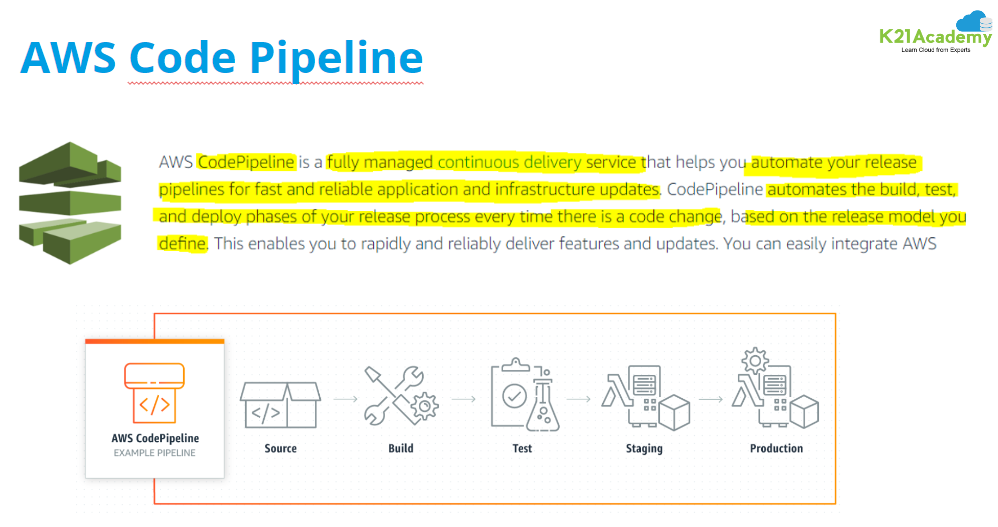
  • Provides a suite of services such as AWS CodePipeline, AWS CodeBuild, AWS CodeDeploy, and AWS CodeCommit that can be used to build, test, and deploy applications in a continuous and automated manner.
  • Supports integration with other AWS services such as Amazon S3, Amazon EC2, AWS Lambda, Amazon CloudWatch, and Amazon Kinesis.
  • Offers support for third-party tools and services such as GitHub, Jenkins, and Atlassian Jira.

Azure DevOps:

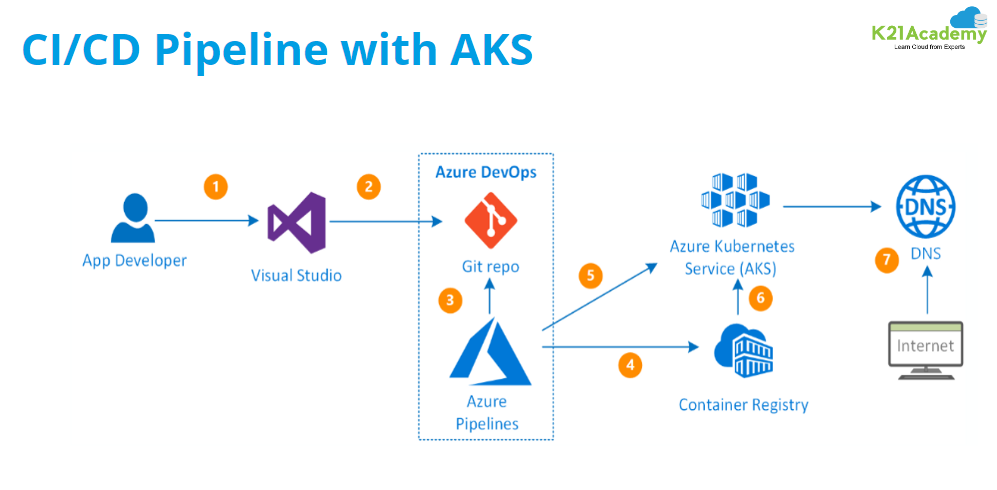
  • Provides a range of services such as Azure Pipelines, Azure Boards, Azure Artifacts, and Azure Test Plans for managing the software development process.
  • Offers integration with various Azure services such as Azure App Service, Azure Virtual Machines, Azure Kubernetes Service, and Azure Functions.
  • Supports integration with third-party tools and services such as GitHub, Jenkins, and Slack.

3. Managing Packages In a Software

image

AWS DevOps offers services such as AWS CodeArtifact and AWS Elastic Container Registry (ECR) for managing and storing packages. AWS CodeArtifact is a fully-managed artifact repository service that enables teams to securely store, publish, and share software packages.

Azure DevOps provides a similar package management service called Azure Artifacts, which is a universal package management tool that allows teams to manage and share software artifacts like NuGet, npm, and Maven packages.

It also provides Azure Container Registry (ACR), a fully-managed Docker container registry service that enables developers to store and manage Docker container images.

4. Pricing

image
  • AWS DevOps pricing is based on the usage of their services, including EC2 instances, S3 storage, CodePipeline, and CodeDeploy.
    The cost will depend on the resources used, the number of users, and the duration of usage.
  • Azure DevOps pricing is based on a per-user model.
    The cost will depend on the number of users and the services used, including Azure Boards, Azure Repos, Azure Artifacts, Azure Test Plans, and Azure DevOps Server.
  • Both AWS and Azure DevOps offer free tiers for their services.
  • In terms of pricing, AWS DevOps can be more cost-effective for smaller teams and shorter durations of usage, while Azure DevOps can be more cost-effective for larger teams with more users who need access to a wider range of services.

In Summary

Overall, the choice between AWS DevOps and Azure DevOps depends on the specific needs and preferences of the organization. Both platforms offer robust toolsets and services for managing the SDLC in the cloud, and both have their strengths and weaknesses.


image

Friday, March 31, 2023

encryptor method in php

 function encryptor($action, $string) {

        $output = false;


        $encrypt_method = "AES-256-CBC";

        //pls set your unique hashing key

        $secret_key = 'secret_key'

        $secret_iv = 'secret_iv'


        // hash

        $key = hash('sha256', $secret_key);


        // iv - encrypt method AES-256-CBC expects 16 bytes - else you will get a warning

        $iv = substr(hash('sha256', $secret_iv), 0, 16);


        //do the encyption given text/string/number

        if ($action == 'encrypt') {

            $output = openssl_encrypt($string, $encrypt_method, $key, 0, $iv);

            $output = base64_encode($output);

        } else if ($action == 'decrypt') {

            //decrypt the given text/string/number

            $output = openssl_decrypt(base64_decode($string), $encrypt_method, $key, 0, $iv);

        }


        return $output;

    }

Sunday, February 19, 2023

DevOps journey

Anyone who have learn Linux do following task for practice which I did in my DevOps journey.
1) setup NFS server and client on other machine
2) setup dns server
3) setup dhcp server
4) install and configure load balancer (nginx or haproxy)
5) install teleport (PAM tool)
6) install databases( mariadb, postgres and mongodb) and access from other machine with database client (cli or gui)
7) install WordPress app and add certificates https (self-signed or letsencrypt)
8) install minio storage (s3 compatible) and configure aws cli to use it
9) do ssh tunnel for exposing application securely
10) create a bash script which will do your one of complete task from previous tasks mentioned
You can use Ubuntu/centos or any os
These tasks can make you confident for new tasks

Saturday, February 11, 2023

Thursday, December 29, 2022

How to add New disk and mount in CentOS 8?


Please follow the below steps for complete the full task

  • Create the partition

  • Format the partition by xfs file system

  • Mount the partition

  • Mount the partition at startup


Create the partition

  • Check the number of partition and disk available using below command

fdisk -l
  • Assume that we got 2 disk /dev/sda which already added and partitioned but /dev/sdb which not partitioned.

  • Start partition by the below command

fdisk /dev/sdb
  • press p for show existing partition

  • there should not be partition if the disk is very new

  • press n for new partition.

  • press p for primary partition.

  • press 1 for specify the partition number.

  • press enter

  • again press enter

  • press w for write changes of the partition to disk.

  • Now the partition is complete


Format the partition by xfs file system

  • Run the below command for find the partition

fdisk -l
  • For format the partition please run the below command

mkfs.xfs /dev/sdb1


Mount the partition

  • Create a directory called /resources by the command mkdir /resources

  • Now connect the partition with the resources directory by the below command.

mount /dev/sdb1 /resources
  • Go to the directory resources and try to create a directory if you are able to do this then the mount is success.

cd /resources
mkdir test


Mount the partition at startup

Before go to deep of the fstab lets see the format of the fstab

<file system>   <dir>       <type>  <options>       <dump>  <pass>
/dev/sdb1     /resources      xfs    defaults         1         2
  • <file system> : defines the storage device

  • <dir> : tells the mount command where it should mount the <file system> to.

  • <type> : defines the file system type of the device or partition to be mounted. ext2, ext3, reiserfs, xfs etc.

  • <options> : define particular options for filesystems.

    • defaults : default mount settings (equivalent to rw,suid,dev,exec,auto,nouser,async).

    • auto : file system will mount automatically at boot

    • rw : mount the filesystem read-write.

    • suid : allow the operation of suid, and sgid bits.

    • exec : allow the execution binaries that are on that partition (default).

    • nouser : only allow root to mount the filesystem (default).

    • async : I/O should be done asynchronously.

  • <dump> : it is used by the dump utility to decide when to make a backup. Possible entries are 0 and 1.

    • 0 : dump will ignore the file system

    • 1 : dump will make a backup.

  • <pass> : fsck reads the <pass> number and determines in which order the file systems should be checked. Possible entries are 0, 1, and 2

    • 0 : not be checked by the fsck utility.

    • 1 : the root directory

    • 2 : all other modifiable file systems;


Let’s mount the disk at startup

  • For mount the disk at startup please follow the below commands

vi /etc/fstab
  • Go to file last and add the below codes there

/dev/sdb1     /resources      xfs    defaults         1 2
  • write and exit the vi editor

Wednesday, December 28, 2022

disbale function of php for server security

 system, exec, shell_exec, passthru, mysql_list_dbs, ini_alter, dl, symlink, link, chgrp, leak, popen, apache_child_terminate, virtual, mb_send_mail

How to solve mysql ERROR 1118 (42000) Row size too large

  I had this issue with MYSQL 5.7 . The following worked althoug...